

Loot Grabber
ARK: Survival AscendedModReleased
One key grabs the loot around you, from bags and crates to corpses, eggs and crops, into your inventory or your creature's. Rules and profiles decide what it takes. Works on PC and console.
My roleCreator
Built withARK DevKitBlueprintsUnreal Engine 5
TagsMod
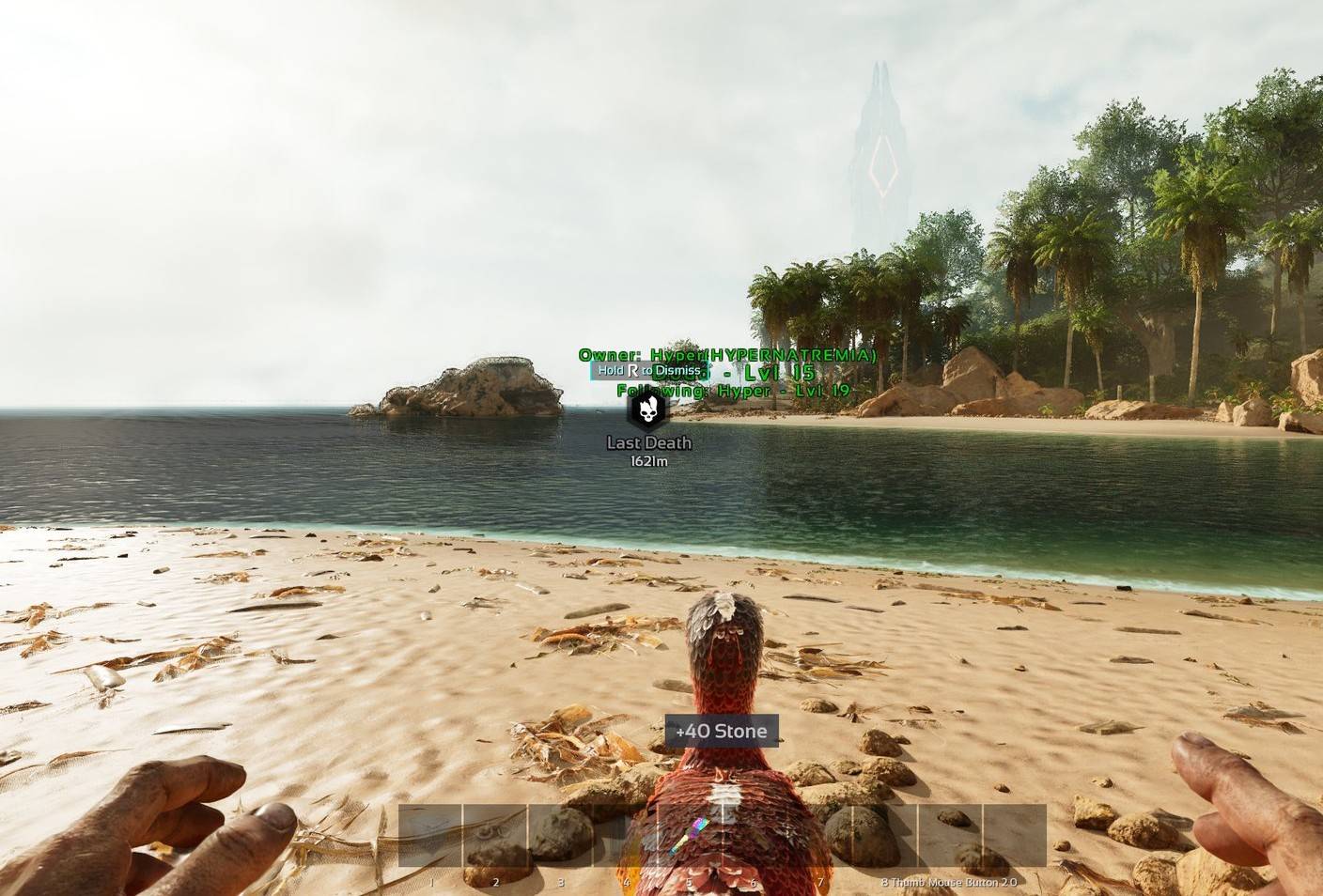
Screenshots
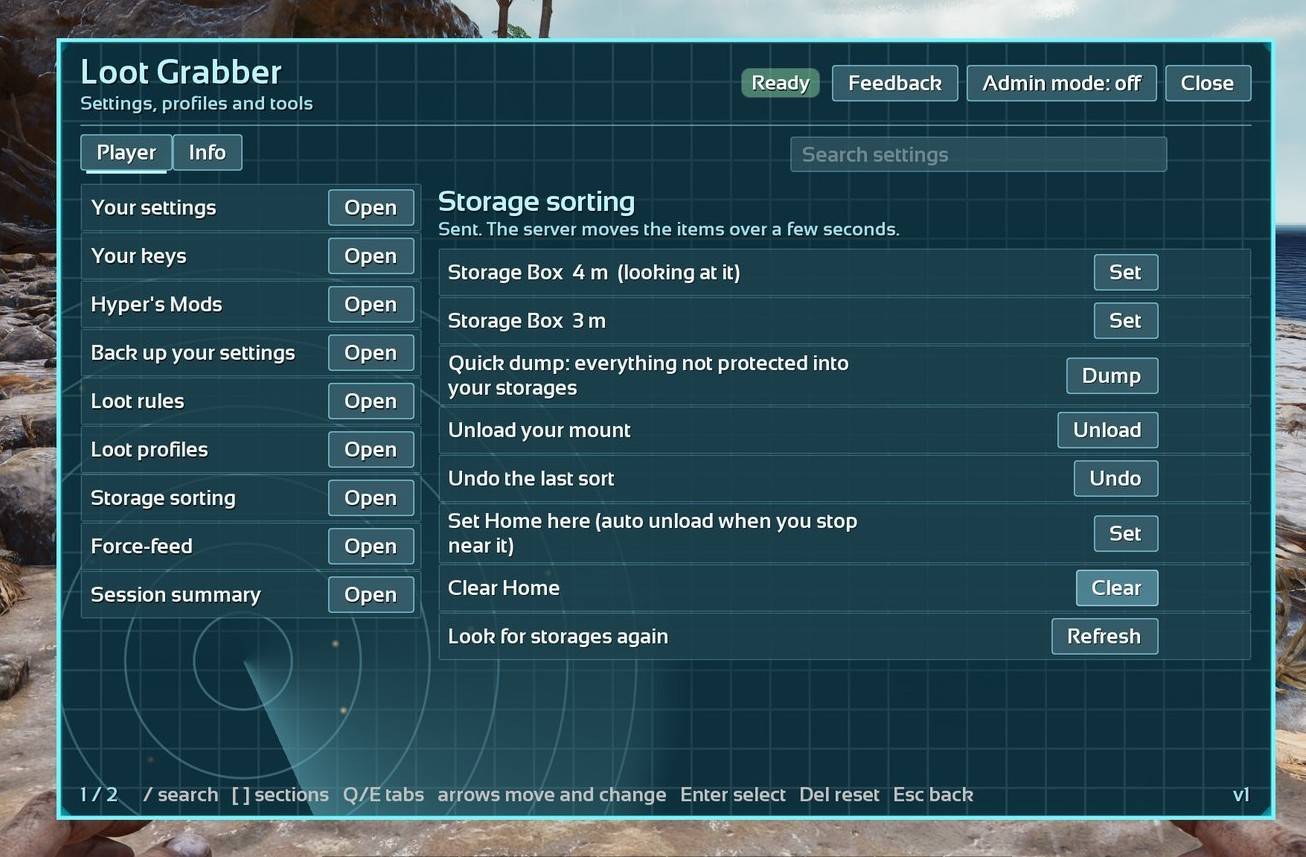
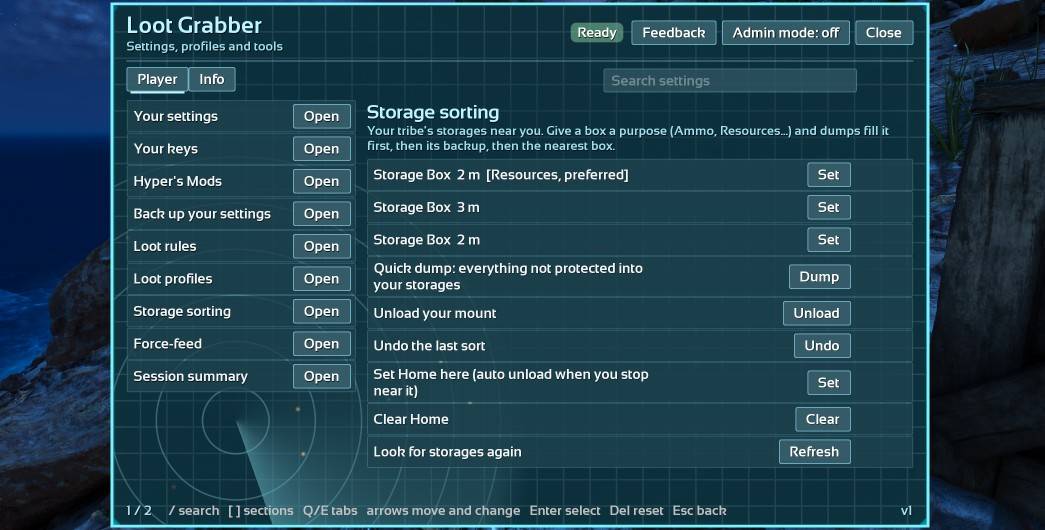
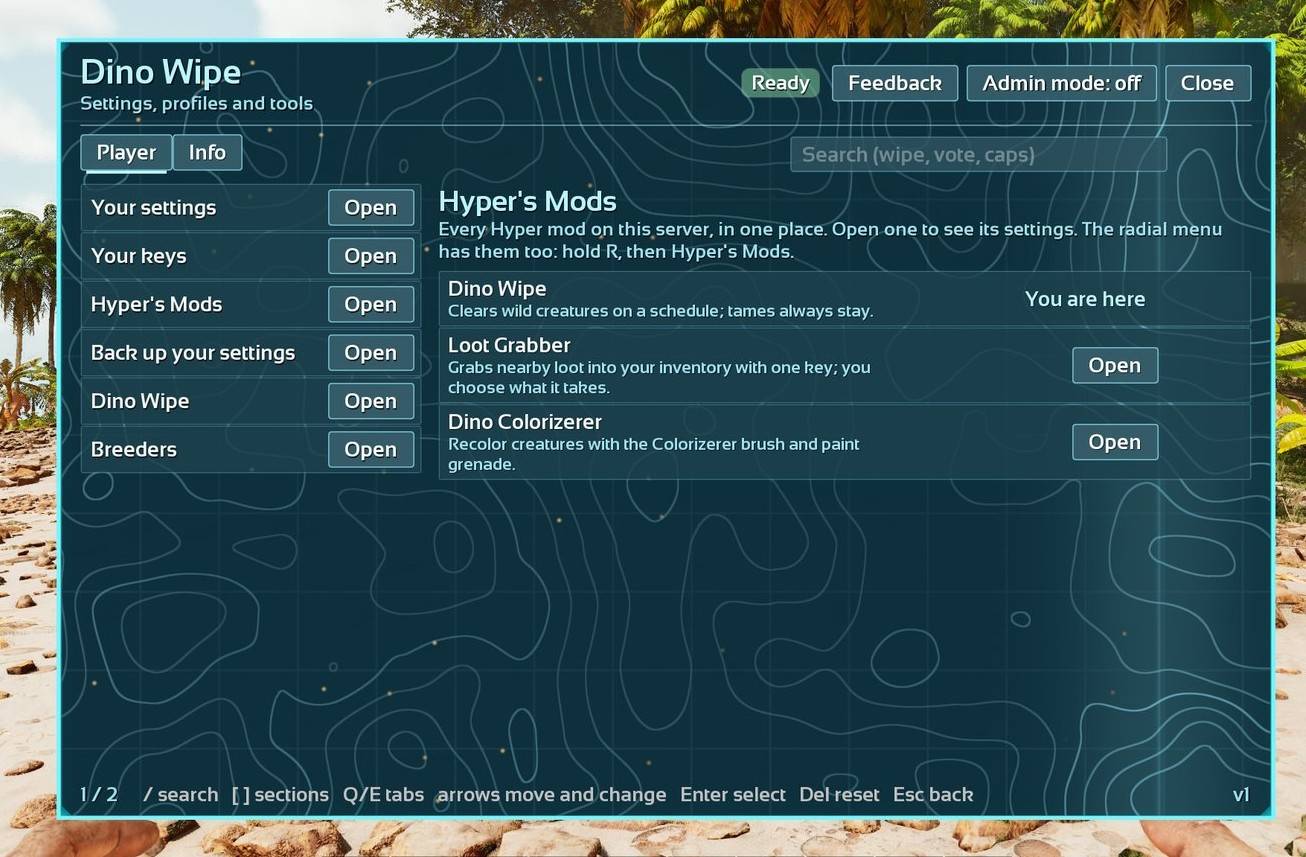
Server stats
Updated Nov 21, 2026, 6:07 AM UTC
Stats started Nov 13, 2026.
526
Servers running it, average per day (since Nov 13)
0.7
Players per server, on average (since Nov 13)
80,300
Server-hours, all servers, since Nov 13
79%
PvE servers
On , the last whole day (UTC), 879 servers ran it. The first figure above is a daily average since Nov 13.
More server stats
| What | 7 days | Since Nov 13 |
|---|---|---|
| Server starts | 5,630 | 5,650 |
| Panel opened | 3,030 | 3,050 |
| Grabs | 1,720,000 | 1,720,000 |
| Grabs that took loot | 48,600 | 48,700 |
| Items grabbed | 131,000,000 | 131,000,000 |
| Automatic grabs | 1,020,000 | 1,020,000 |
| From the ground | 6,160,000 | 6,160,000 |
| From bags | 70,900,000 | 70,900,000 |
| From bodies | 2,060,000 | 2,060,000 |
| From crates | 523,000 | 523,000 |
| From beaver dams | 1,400,000 | 1,400,000 |
| Eggs | 7,940 | 7,940 |
| From crop plots | 50,200,000 | 50,200,000 |
Items moved by source and item (since Nov 13)
- Raw Meat (deathbag)4,710,000
- Wood (deathbag)3,120,000
- Raw Meat (deathbag)2,700,000
- Stone (crop)2,310,000
- Wood (crop)2,290,000
- Thatch (crop)2,200,000
- Hide (deathbag)2,140,000
- Metal (crop)2,100,000
- Fiber (crop)1,890,000
- Metal (deathbag)1,720,000
How grabs were asked for (since Nov 13)
- auto1,280,000
- key512,000
- preview904
Whole-server frame time (since Nov 13)
This is the whole server, not just this mod. ARK servers normally run near 33 ms a frame.
- under 16 ms0%
- 16-33 ms31%
- 33-50 ms67%
- 50-100 ms1%
- 100-200 ms0%
- over 200 ms0%
Maps (since Nov 13)
- Ragnarok27%
- Astraeos23%
- The Island11%
- Valguero10%
- Genesis Part 15%
- The Center4%
- Extinction4%
- Lost Colony4%
- Scorched Earth2%
- Forglar2%
Versions in use (7 days)
- Stats build 174%
- Stats build 7726%
- Stats build 750%
- Stats build 780%
How these numbers are collected
Servers running this mod send counts every few hours: totals only. No player names, ids or IP addresses. Each server sends under a random key that isn't linked to its name, and a new server only counts here after a day of normal reports.
Server owners can turn it off with StatsEnabled=False. Players can opt out with "Count me in the stats" in the mod's panel. Feedback is sent only when a player writes some, and their name only if they tick the box.
Numbers are rounded. More in the privacy page.
Recent updates
Changelogv77Nov 19, 2026PC, PC server, Xbox, PS5
- Version: the panel and CurseForge both show 77 again (the previous file showed 77 in game but 76 on CurseForge).
- Changed: rebuilt on the latest shared code. The admin test command now uses the game's current server-admin flag.
v76Nov 18, 2026PC, PC server, Xbox, PS5
- Fixed: beaver dams and other wild-owned containers were skipped as "not yours to take". Anything owned by a wild creature's team now counts as wild loot. Other players' and tribes' things are still refused.
- Changed: players can turn "Stop at the weight limit" off for themselves. With it off, a grab can take you past the weight limit, up to 300 used inventory slots. Once you're over the limit, the game itself stops further pickups until you drop some weight.
- Fixed: on Your settings, other switches the server controls (such as other tribes' bags, bodies and drops) offered a change that did nothing and said "Changed by you". They now show as set by the server. Server admins change them on the Server tab with Admin mode on.
- Changed: Loot Grabber never takes from or sorts items into obelisks, tribute terminals, or structures built on them (such as boss summoning beacons and altars).
- Panel: the yes/no mark follows the highlighted button, and "Reset all" asks before it resets.
- Note: the panel in game shows this file as version 77. The next update brings the two numbers back in line.
v72Nov 16, 2026PC, PC server, Xbox, PS5
New
- Admins can block force-feed items or allow only a list of them (Never force-feed these / Force-feed only these)
Fixes
- Loot dropped by mods with their own drop effects is grabbed now (it said "Nothing to grab nearby"). Highlights and the preview count show it too
- A drop the game lets you pick up by hand is no longer skipped as "not yours to take"
- Grab radius can now go past 30 m when the server's Largest grab radius allows it. Server owners: raise both the Grab radius and the Largest grab radius
About this project
Loot Grabber
🆔 Mod ID: 935985
One key grabs the loot around you. Bags, dropped items, supply and cave crates, corpses, eggs, crops, beaver dams and blueprints come straight to your inventory, or to your creature while you ride. You decide what it takes with rules and profiles, and it can sort what you carry into your storage boxes.
Completely rebuilt. Everything can be set up in game: no ini editing needed. Works on PC and console, with keyboard and mouse or a controller.
🚀 Getting started
- Stand near loot and press Crouch (C on keyboard). Everything allowed within your grab radius comes to you, and the loot feed lists what it took and why anything was left.
- Open the panel to change anything:
- the Loot Grabber (or Hyper's Mods) button at the top right of your inventory
- the radial menu (hold R on keyboard), then Loot Grabber
- a panel key you pick under Your keys
- Rebind the grab key under Your keys (any key, a tap or a hold, or a controller button).
✨ What it does
🎒 Grabbing
- Sources, each one has a switch: death bags and item bags, dropped items, supply and cave crates, beaver dams, corpses (and their armor and saddle), eggs, crop plots (produce only, never seeds or fertilizer), blueprints, feces (off by default)
- Preview: hold the preview key to see what a grab would take
- Auto grab (off by default): grabs by itself while you stand still, pauses near enemy bases
- While riding, loot goes to your creature, and stacks you already carry are topped up first
- Respects crate level ranges, tribe and ally ownership, other tribes' eggs, and inventories another player has open
- Stops at your weight limit, or turn that off for yourself (a grab still stops at 300 used slots)
- Highlights color nearby loot by what a grab would do (color blind friendly) or by item tier
- Grab effects: Sparkle, Magnet, Burst, Absorb or Pulse. Only you see them
📜 Rules and profiles
- Always grab, never grab, protect, or keep the best #, with up to six conditions per rule (name, type, quality, blueprint and more)
- Keep best copies compares real stats for saddles, armor and weapons
- Teach by example: make a rule from an item you carry in one step
- Up to five profiles per character, each shareable as a code. Mount profiles switch by themselves based on what you ride
📦 Storage sorting
- Give each storage box a purpose, then Dump what you carry, Unload your creature, or Sort the boxes, with Undo for the last sort
- Auto unload when you get home (your creature, you, or both)
- Folder rules put items into inventory folders
🗑️ Junk and force-feed
- Junk: ignore it, drop it in a bag, send it to junk storage, or destroy it (only when the server allows it and you opt in)
- Force feed uses your listed food when a stat runs low (you or your mount), keeping one of each in reserve
📊 Session summary when you log out, or any time from the panel: grabs, items, sources, and what was skipped and why.
🛠️ For server owners
- Every setting has a page in the panel: turn on Admin mode, then Server. Search, reset, and lock (players can't change a locked setting)
- Server limits: grab radius cap, items per grab, sources per grab, items per second, cooldown and queue
- PvP options: smaller radius, no grabbing in combat, highlights need sight, base game access checks
- One switch (
NoGrab=True) blocks grabbing for everyone - Export and import all settings as text to copy them to another server
- The full ini list, every console command and a default ini block are below
🤝 Works with the other Hyper's mods
With two or more Hyper's mods on a server, they share one Hyper's Mods inventory button and one radial folder.
🔒 Privacy
The mod sends anonymous totals (how many grabs, items and so on, never names or chat) and short health reports to Hypernatrema.com, so problems get fixed faster. Turn it off for the whole server with StatsEnabled=False and
StatusFeed=False. Each player can opt out under Your settings (Share stats).
💬 Support
Questions, bugs or ideas: join the Discord, https://discord.gg/jAHHABkuq5
⚠️ Known issues
- The keyboard focus highlight is hard to see in panels
- The session summary counts a dump as a grab
- Server page: the Grab radius row still says "Default" after you change it
⚙️ Server settings (GameUserSettings.ini)
Every setting goes under [LootGrabber] in GameUserSettings.ini. You only need the lines you want to change: anything you leave out uses its default. Restart the server after editing the file.
Most settings can also be changed live, without the ini: open the panel, turn on Admin mode, then Server. Or use the console: cheat ScriptCommand Hyp_LGR set {key} {value}. Settings marked Ini only can only be set in the file.
Who: Server = admins decide. Player = the ini sets the server default (and for limits, the most allowed), and each player can pick their own value in the panel under Your settings. Admins can lock any Player setting so players can't change it (cheat ScriptCommand Hyp_LGR lock {key}).
Distances are in game units (100 = 1 meter), except settings with Meters in the name. Lists are comma separated, like Neon,Metallic.
⭐ Basics
| Ini key | Default | Allowed | Who | What it does |
|---|---|---|---|---|
ReworkPickupRadius |
900 | 100 to 10000 | Player | How far around you loot is grabbed. The server sets the most allowed. |
NoGrab |
False | True / False | Server | On: nobody on this server can grab loot. The grab key does nothing. |
GrabEnabled |
True | True / False | Player | Turns the grab key on or off for you. |
PreviewEnabled |
True | True / False | Player | Hold the Preview key to see what a grab would take before you grab. |
AutoGrab |
False | True / False | Player | Grabs nearby loot by itself every few seconds while you stand still. Pauses near enemy bases. |
AutoGrabSeconds |
2.5 | 1 to 30 | Server | Seconds between automatic grabs, counted from the last grab of any kind. |
AutoGrabEnemyStructures |
10 | 0 to 500 | Server | Auto grab pauses when more than this many enemy structures are in range (0 = any). |
🎯 What to grab
| Ini key | Default | Allowed | Who | What it does |
|---|---|---|---|---|
BagLooting |
True | True / False | Player | Grab from death bags and item bags. |
ItemLooting |
True | True / False | Player | Grab single items lying on the ground. |
SupplyDropLooting |
True | True / False | Player | Grab from supply and cave crates. What you can't carry drops in a bag at the crate. |
BeaverDamLooting |
True | True / False | Player | Grab wood, cementing paste and more from beaver dams. |
DinoCorpseLooting |
True | True / False | Player | Grab from dead creatures and player bodies. |
FertEggLooting |
True | True / False | Player | Grab fertilized eggs (the ones that hatch). |
OverrideGroundCheckForDrops |
False | True / False | Server | Also grab drops far above or below players (cliffs, bases on stilts). |
EggLooting |
True | True / False | Player | Grab unfertilized eggs (kibble eggs). |
CropLooting |
True | True / False | Player | Grab produce from crop plots. Seeds and fertilizer are never taken. |
FecesLooting |
False | True / False | Player | Grab feces lying on the ground. |
TakeCorpseEquipment |
True | True / False | Player | Also take the armor and saddle a body is wearing. |
BlueprintLooting |
True | True / False | Player | Grab item blueprints. |
DestroyLootedBeaverDams |
True | True / False | Server | Removes a beaver dam once a grab empties it. Never another tribe's. |
👥 Whose loot
| Ini key | Default | Allowed | Who | What it does |
|---|---|---|---|---|
PvEAlliedBags |
True | True / False | Player | Bags from you, your tribe and your allies. |
PvENonAllyBags |
False | True / False | Player | Other tribes' bags, but only if the game lets you open them. |
PvEAlliedCorpses |
True | True / False | Player | Bodies of you, your tribe and your allies. |
PvENonAllyCorpses |
False | True / False | Player | Other tribes' bodies, but only if the game lets you open them. |
PvEWildCorpses |
True | True / False | Player | Bodies of wild creatures. |
PvEAlliedDrops |
True | True / False | Player | Items dropped by you, your tribe or allies, and items anyone can take. |
PvENonAllyDrops |
False | True / False | Player | Items locked to another tribe. |
PvENonAllyCrops |
False | True / False | Player | Other tribes' crop plots, but only if the game lets you open them. |
SkipWhenViewed |
True | True / False | Player | Never grab from something another player has open. |
PvPRespectAccess |
False | True / False | Server | PvP: use the game's own access check for bags, bodies and crops. |
EggGuard |
PvE | Off / PvE / Always | Server | Eggs laid by another tribe's creatures, or lying near another tribe's buildings, are never grabbed. Off, PvE servers only, or always. |
EggGuardRadius |
3000 | 0 to 10000 | Server | An egg this close to another tribe's building counts as theirs. 0 turns this check off. |
EggGuardSight |
True | True / False | Server | Eggs you can't see from where you stand (behind walls) are left alone, unless your tribe's creature laid them. |
🏷️ Item types
| Ini key | Default | Allowed | Who | What it does |
|---|---|---|---|---|
IgnoreCosmetics |
True | True / False | Player | Leave costumes and cosmetics. Emote unlocks are still grabbed. |
IgnoreSkins |
True | True / False | Player | Leave weapon, armor, saddle and structure skins. |
GrabChibis |
True | True / False | Player | Grab chibis even while skins and cosmetics are left. |
IgnoreRecipeNotes |
True | True / False | Player | Leave recipe notes (kibble, soups). Recipes players wrote are still grabbed. |
⚖️ Weight and space
| Ini key | Default | Allowed | Who | What it does |
|---|---|---|---|---|
GrabTarget |
Mount | Mount / Player | Player | Where loot goes while you ride: the creature (Mount) or you (Player). |
TopUpStacks |
True | True / False | Player | Fill stacks you already carry first (ammo, arrows). |
RespectWeight |
True | True / False | Player | Stop grabbing before you're overweight. Off: grabs still stop at 300 used inventory slots, yours or your creature's. |
RespectCrateLevel |
True | True / False | Server | Leave crates outside your level range alone, like the game does. |
AllowPartialStacks |
True | True / False | Server | Take part of a stack when the whole stack doesn't fit. |
🔦 Highlights
| Ini key | Default | Allowed | Who | What it does |
|---|---|---|---|---|
ServerParticle |
True | True / False | Player | Lets players turn on loot highlight markers. |
Highlights |
False | True / False | Player | Markers on loot near you: what a grab would take, skip or leave. |
HighlightRadius |
1500 | 100 to 5000 | Player | How far away loot gets a marker. |
HighlightColors |
Safe | Safe / Quality | Player | Safe: colorblind friendly, by what a grab would do. Quality: by item tier. |
HighlightTextRange |
800 | 100 to 3000 | Player | Markers closer than this also show the item's name. |
📰 Loot feed
| Ini key | Default | Allowed | Who | What it does |
|---|---|---|---|---|
GrabNotify |
True | True / False | Player | A line after each grab listing what it took. |
FeedReasons |
True | True / False | Player | The line also says why items were left behind. |
SessionSummary |
True | True / False | Player | A summary of your grabs when you log out, or when you ask for it. |
FeedImportant |
True | True / False | Player | Artifacts and items your rules mark as priority get their own card. |
🎆 Grab effects
| Ini key | Default | Allowed | Who | What it does |
|---|---|---|---|---|
GrabEffectsOff |
False | True / False | Ini only | Server ini only: True turns grab effects off for everyone. Set it in the ini file only, then restart the server. |
GrabEffectsBlocked |
(empty) | text (up to 128 characters) | Ini only | Server ini only: effect styles players can't use, for example Magnet,Burst. A blocked style shows Sparkle instead, or nothing if Sparkle is blocked too. Set it in the ini file only, then restart the server. |
GrabEffect |
Sparkle | Off / Sparkle / Magnet / Burst / Absorb / Pulse | Player | What you see when a grab takes loot. Sparkle: a glint where it was. Magnet: the loot flies to you. Burst: a colored burst where it was. Absorb: a swirl around you. Pulse: a ring from you. Only you see it. |
GrabEffectColor |
Gold | Gold / Blue / Green / Purple / Red / White | Player | The color of the Burst effect. Ini key GrabEffectColor (the old GrabEffectColour also works). |
GrabEffectSize |
1.0 | 0.5 to 2.0 | Player | How big the grab effect is (1 = normal). |
📜 Rules and profiles
| Ini key | Default | Allowed | Who | What it does |
|---|---|---|---|---|
LgRulesEnabled |
True | True / False | Player | Your rules and profiles decide what is grabbed. Off: grab everything allowed. |
LgMaxRules |
64 | 4 to 200 | Server | Most rules a profile can have. |
LgMaxConds |
6 | 1 to 8 | Server | Most conditions a rule can have. |
LgMaxProfileLen |
1536 | 256 to 4000 | Server | Longest profile code the server keeps, in characters. |
LgMaxProfiles |
5 | 1 to 8 | Server | Profile slots each character gets. |
LgWeightPriorityPct |
80 | 10 to 100 | Player | At this percent of your max weight, auto grab takes priority items only. |
LgWeightStopPct |
95 | 10 to 100 | Player | At this percent of your max weight, auto grab stops. The grab key still works. |
LgBestCopies |
True | True / False | Player | Keep-best rules compare saddles, armor and weapons by their stats. |
LgAutoSwitch |
True | True / False | Player | Switch profiles based on the creature you ride. |
LgTeachEnabled |
True | True / False | Player | Make a rule from an item you carry: always grab, never grab or protect it. |
🗑️ Junk
| Ini key | Default | Allowed | Who | What it does |
|---|---|---|---|---|
LgJunkAction |
Ignore | Ignore / Drop / JunkStorage / Destroy | Player | What happens to your junk: ignore it, drop it in a bag, put it in junk storage, or destroy it. |
LgAllowDestroy |
False | True / False | Server | Lets players choose to destroy junk. |
LgDestroyOptIn |
False | True / False | Player | Lets your junk be destroyed. Only works if the server allows it too. |
LgAllowDrop |
True | True / False | Player | Lets junk be dropped in a bag. |
📦 Storage and folders
| Ini key | Default | Allowed | Who | What it does |
|---|---|---|---|---|
LgStorageEnabled |
True | True / False | Player | Dump, unload and sort into storages you can open. |
LgMaxPurposes |
200 | 10 to 2000 | Server | How many storage purposes each tribe can set. |
LgStoreRadius |
3000 | 300 to 10000 | Player | Use storages within this distance. |
LgStoreRadiusPvP |
1500 | 300 to 10000 | Server | PvP: the largest storage radius. |
LgDumpCooldown |
10 | 0 to 600 | Server | Seconds between dumps and unloads. |
LgDumpCombatPvP |
True | True / False | Server | PvP: no dump or unload while in combat. |
LgOverflow |
Next | Next / Leave / Report | Player | When a storage is full: use the Next one, Leave the rest, or leave it and Report. |
LgAutoUnloadAllowed |
True | True / False | Server | Lets players unload automatically when they get home. |
LgAutoUnload |
False | True / False | Player | Unload when you stop near home, out of combat. |
LgHomeRadius |
1500 | 300 to 5000 | Player | How close to home counts as being home. |
LgUndoSeconds |
180 | 0 to 600 | Server | How long you can undo the last sort, in seconds (0 = no undo). |
LgMountUnload |
True | True / False | Player | Unload the creature you ride into storages. |
LgFoldersAllowed |
True | True / False | Server | Lets players use folder rules. |
LgFolders |
False | True / False | Player | Put items into inventory folders by your rules. |
LgDumpMax |
300 | 10 to 2000 | Server | Most items one dump or unload can move. |
LgStoreMax |
48 | 4 to 128 | Server | Most storages one dump looks at. |
LgHomeUnload |
Mount | Mount / Player / Both | Player | What auto unload empties at home: your creature (Mount), you (Player) or Both. |
🍖 Force-feed
| Ini key | Default | Allowed | Who | What it does |
|---|---|---|---|---|
LgFeedAllowed |
False | True / False | Server | Turns force-feed on for this server. |
LgFeed |
False | True / False | Player | Use the listed food and consumables for you and your mount when stats run low. |
LgFeedStartPct |
60 | 5 to 95 | Player | Start when a stat drops below this percent. |
LgFeedStopPct |
90 | 10 to 100 | Player | Stop when the stat reaches this percent. |
LgFeedReserve |
1 | 0 to 100 | Player | Never use the last ones of each consumable. |
LgFeedCombatLock |
Auto | Auto / On / Off | Server | No force-feed in combat. Auto: on for PvP servers, off for PvE. |
LgFeedSeconds |
5 | 2 to 60 | Server | Seconds between force-feed checks. |
LgFeedMaxClasses |
16 | 1 to 32 | Server | Most consumables one list may have. |
LgFeedBlocked |
(empty) | text (up to 2048 characters) | Server | Items force-feed never uses. Class names or paths, comma separated; child classes count. |
LgFeedOnly |
(empty) | text (up to 2048 characters) | Server | When set, force-feed uses only these items. Class names or paths, comma separated. Empty: any item. |
🚦 Server limits
| Ini key | Default | Allowed | Who | What it does |
|---|---|---|---|---|
GrabCooldown |
0.5 | 0.25 to 10 | Server | Seconds a player waits between grabs. |
GrabRadiusMax |
3000 | 100 to 10000 | Server | The largest grab radius anyone can use. |
MaxItemsPerGrab |
300 | 10 to 2000 | Server | Most items one grab can move. |
MaxSourcesPerGrab |
40 | 5 to 200 | Server | Most bags, bodies and crates one grab looks at. |
TransferPerSecond |
200 | 10 to 2000 | Server | Items moved per second for each player. Lower means less server load. |
TransferTick |
0.1 | 0.05 to 1.0 | Server | Seconds between move batches. |
MaxQueue |
600 | 50 to 5000 | Server | Most moves waiting for each player. |
GroundCheckHeight |
300 | 50 to 5000 | Server | Skip drops farther above or below a player than this. |
GroundTraceDistance |
1000 | 0 to 5000 | Server | How far below a tall mount grabs look for the ground. |
⚔️ PvP
| Ini key | Default | Allowed | Who | What it does |
|---|---|---|---|---|
PvPRadiusMax |
1200 | 100 to 10000 | Server | PvP: the largest grab radius. |
PvPNoGrabInCombat |
True | True / False | Server | PvP: no grabbing while in combat. |
HighlightNeedsLOS |
True | True / False | Server | PvP: markers only on loot you can see. |
HighlightRadiusPvP |
1500 | 100 to 10000 | Server | PvP: the largest highlight radius. |
🧰 Shared settings (every Hyper mod has these)
Panel access, logs, request limits, anonymous stats, the admin list and your cards. Most servers never change these.
| Ini key | Default | Allowed | Who | What it does |
|---|---|---|---|---|
Enabled |
True | True / False | Server | Turns the mod on or off. Status, commands and admin mode still work when it's off. |
LogLevel |
Info | Trace / Info / Warn / Error | Server | How much the mod writes to the server log. |
DebugEnabled |
False | True / False | Server | Starts the server with debug on. You can also switch it live with 'debug on' or 'debug off'. |
DebugForwardLevel |
Info | Trace / Info / Warn / Error | Server | The lowest log level sent to admins who follow the live log. |
RingSize |
200 | 50 to 1000 | Server | How many recent log lines the server keeps for the debug page. |
PageSize |
100 | 10 to 100 | Server | Rows on each page of a list. |
RateScale |
1.0 | 0.25 to 10 | Server | Slows down how often players can send requests (1 = normal, 2 = half as often). |
FloodCalls |
20 | 5 to 200 | Server | Requests each player can send every 2 seconds. |
NotifyRefusals |
True | True / False | Server | Tells players why something they tried was refused. |
PanelForPlayers |
True | True / False | Server | Lets players who aren't admins open the panel. |
LogChannels |
(empty) | text (up to 256 characters) | Server | Log levels per channel, like grab:Trace,http:Warn. |
NotifyAdminsOnError |
False | True / False | Server | Sends every error to the admins who are online as a card. |
NotifyRate |
5 | 1 to 20 | Server | Most cards a player gets every 10 seconds. |
WebCodes |
True | True / False | Server | Lets you share server settings through a short code on the website. |
StatsEnabled |
True | True / False | Server | Shares anonymous totals with the mod's website. Turn off to share nothing. |
StatusFeed |
True | True / False | Server | Sends short health reports (no names, no chat) so problems get fixed faster. |
StatsHours |
3.0 | 1 to 12 | Server | Hours between stats uploads. |
StatsBatchKB |
16 | 4 to 32 | Server | Upload sooner once this much is waiting (KB). |
StatDeltaCap |
1000000 | 1000 to 100000000 | Server | Highest count any one stat can add per upload. |
StatsDisplay |
All | All / Admins / Off | Server | Who can see the Stats page. |
StatsToken |
(empty) | text (up to 128 characters) | Ini only | A token from the website, if you were given one. Most servers leave this empty. Set it in the ini file only, then restart the server. |
CommEnabled |
True | True / False | Server | Lets other mods ask this one questions. |
CommAllowLoosen |
False | True / False | Server | Lets other mods loosen this mod's rules too, not only tighten them. |
CommMaxSeconds |
600 | 5 to 86400 | Server | Longest time another mod can change a setting for. |
HeartbeatSeconds |
60 | 15 to 600 | Server | Seconds between the mod's health checks. |
JobDelay |
0.05 | 0.02 to 2 | Server | Seconds between each step of long jobs. |
JobBudgetMs |
4 | 1 to 50 | Server | How much a long job does in each step. |
SafeModeOnBootFail |
True | True / False | Server | If the mod fails to start properly, it switches to safe mode. |
BindPossession |
False | True / False | Server | Also set players up when they spawn, not only when they join. |
AdminAllowlist |
(empty) | text (up to 2048 characters) | Ini only | Your admins, as id:tier,id:tier with their account ids. Set it in the ini file only, then restart the server. |
AllowlistEditors |
CheatAdmin | CheatAdmin / ListedAdmin / Nobody | Ini only | Who can change the admin list from the panel. Set it in the ini file only, then restart the server. |
AdminsNeedAllowlist |
False | True / False | Ini only | Server admins count as mod admins only if they're on the admin list. Set it in the ini file only, then restart the server. |
CommandPrefix |
(empty) | text (up to 24 characters) | Ini only | A different command prefix, for when two mods use the same one. Set it in the ini file only, then restart the server. |
NotifyScale |
1.0 | 0.75 to 1.5 | Player | How big your cards are. |
NotifyCorner |
TopRight | TopRight / TopLeft / BottomRight / BottomLeft | Player | Which corner of the screen your cards show up in. |
NotifyMax |
4 | 1 to 8 | Player | How many cards you see at once. |
NotifySounds |
True | True / False | Player | Plays a sound when a card shows up. |
NotifyOverMenus |
True | True / False | Player | Shows cards while your inventory, map or other menus are open. |
AdminCards |
True | True / False | Player | Shows you the cards sent to all admins (admins only). |
ShareStats |
True | True / False | Player | Counts what you do in the mod's overall stats. Totals only, never your name. |
PanelEffects |
Full | Full / Reduced / Off | Player | The panel's moving background: Full, Reduced (slower) or Off (still). |
💻 Console commands
As an admin in game: cheat ScriptCommand Hyp_LGR {command}. Over RCON: ScriptCommand Hyp_LGR {command} (RCON gets no reply text; the answer goes to the server log). Players can run the commands marked Player in the chat console the same way.
| Command | Who | What it does |
|---|---|---|
help [command] |
Moderator | Lists the commands you can run, or explains one. |
version |
Moderator | Shows the mod's name and version. |
status |
Moderator | How the mod is doing, in one line. |
settings [key] |
Admin | Lists every setting with its value and where it came from. |
settings ini |
Admin | Writes your current settings as an ini block you can paste. |
settings export |
Admin | Gives you the server settings as text to copy to another server. |
settings import {text} [confirm] |
Admin | Shows what would change, then applies it with 'confirm'. |
set {key} {value} |
Moderator | Changes a server setting. |
unset {key} |
Moderator | Puts a setting back to its default. |
reload |
Admin | Reloads the settings. Changes to the ini file still need a restart. |
debug on/off |
Admin | Turns server debug on or off. |
debug dump [n] |
Admin | Copies the mod's most recent log lines into the server log. Add a number to choose how many. |
debug level {0..3} |
Admin | Changes how much the mod writes to its log until the next restart: 0 everything, 1 normal, 2 warnings, 3 errors only. |
debug stats |
Admin | Writes how many requests players sent the server, by kind, to the server log. |
lock {key} |
Moderator | Locks a setting so players can't change it. |
unlock {key} |
Moderator | Lets players change a setting again. |
adminmode |
Admin | Shows who has admin mode on. |
stats [send/body/reset/every {minutes/off}] |
Admin | Shows the server's stats. 'send' uploads now; in the devkit 'reset' clears them and 'every N' uploads every N minutes. |
comm |
Admin | Shows the other mods this one talks to. |
panel [page] |
Moderator | Opens the panel. |
players |
Moderator | Shows who's online and set up. |
allowlist |
Admin | Shows the admin list. |
jobs |
Moderator | Shows the mod's tasks that are running right now. |
job cancel {kind} |
Admin | Stops a running task. |
safemode on/off [confirm] |
Admin | Turns safe mode on or off. |
📋 Default ini block
Every setting of this mod with its default, ready to paste under the section and edit. Lines you don't change can be deleted.
[LootGrabber]
BagLooting=True
ItemLooting=True
SupplyDropLooting=True
BeaverDamLooting=True
DinoCorpseLooting=True
FertEggLooting=True
ReworkPickupRadius=900
ServerParticle=True
NoGrab=False
OverrideGroundCheckForDrops=False
EggLooting=True
CropLooting=True
FecesLooting=False
TakeCorpseEquipment=True
BlueprintLooting=True
GrabEnabled=True
GrabTarget=Mount
TopUpStacks=True
PvEAlliedBags=True
PvENonAllyBags=False
PvEAlliedCorpses=True
PvENonAllyCorpses=False
PvEWildCorpses=True
PvEAlliedDrops=True
PvENonAllyDrops=False
PvENonAllyCrops=False
SkipWhenViewed=True
PvPRespectAccess=False
RespectWeight=True
RespectCrateLevel=True
AllowPartialStacks=True
GrabCooldown=0.5
GrabRadiusMax=3000
MaxItemsPerGrab=300
MaxSourcesPerGrab=40
TransferPerSecond=200
TransferTick=0.1
MaxQueue=600
GroundCheckHeight=300
PvPRadiusMax=1200
PvPNoGrabInCombat=True
HighlightNeedsLOS=True
HighlightRadiusPvP=1500
PreviewEnabled=True
Highlights=False
HighlightRadius=1500
GrabNotify=True
FeedReasons=True
SessionSummary=True
AutoGrab=False
AutoGrabSeconds=2.5
AutoGrabEnemyStructures=10
IgnoreCosmetics=True
IgnoreSkins=True
GrabChibis=True
DestroyLootedBeaverDams=True
IgnoreRecipeNotes=True
GrabEffectsOff=False
GrabEffectsBlocked=
EggGuard=PvE
EggGuardRadius=3000
EggGuardSight=True
GroundTraceDistance=1000
LgRulesEnabled=True
LgMaxRules=64
LgMaxConds=6
LgMaxProfileLen=1536
LgMaxProfiles=5
LgWeightPriorityPct=80
LgWeightStopPct=95
LgBestCopies=True
LgAutoSwitch=True
LgTeachEnabled=True
LgJunkAction=Ignore
LgAllowDestroy=False
LgDestroyOptIn=False
LgAllowDrop=True
LgStorageEnabled=True
LgMaxPurposes=200
LgStoreRadius=3000
LgStoreRadiusPvP=1500
LgDumpCooldown=10
LgDumpCombatPvP=True
LgOverflow=Next
LgAutoUnloadAllowed=True
LgAutoUnload=False
LgHomeRadius=1500
LgUndoSeconds=180
LgMountUnload=True
LgFoldersAllowed=True
LgFolders=False
LgDumpMax=300
LgStoreMax=48
LgHomeUnload=Mount
LgFeedAllowed=False
LgFeed=False
LgFeedStartPct=60
LgFeedStopPct=90
LgFeedReserve=1
LgFeedCombatLock=Auto
LgFeedSeconds=5
LgFeedMaxClasses=16
LgFeedBlocked=
LgFeedOnly=
HighlightColors=Safe
HighlightTextRange=800
FeedImportant=True
GrabEffect=Sparkle
GrabEffectColor=Gold
GrabEffectSize=1.0