

Hyper's Super Duper Dino Colorizerer
ARK: Survival AscendedModReleased
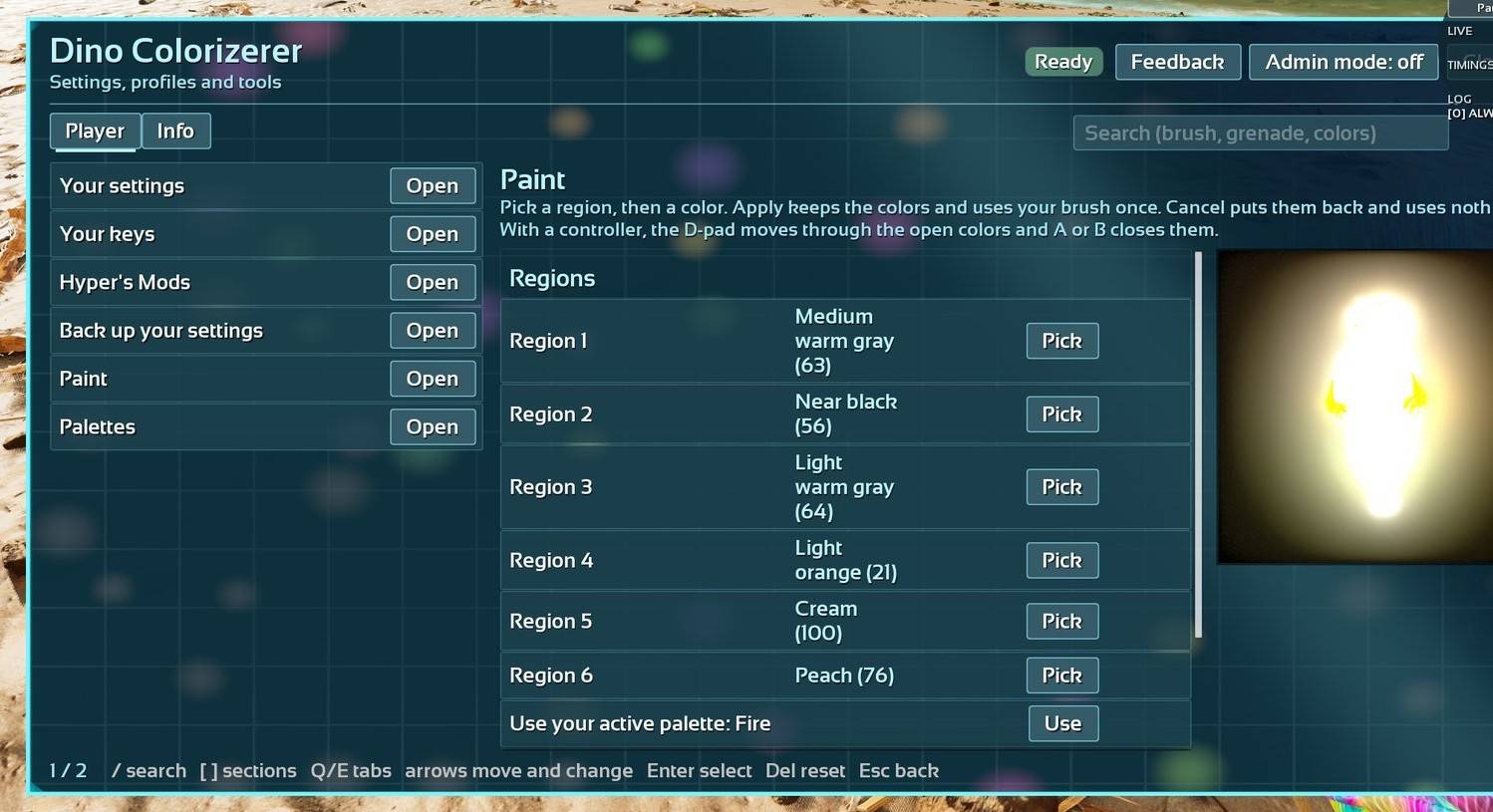
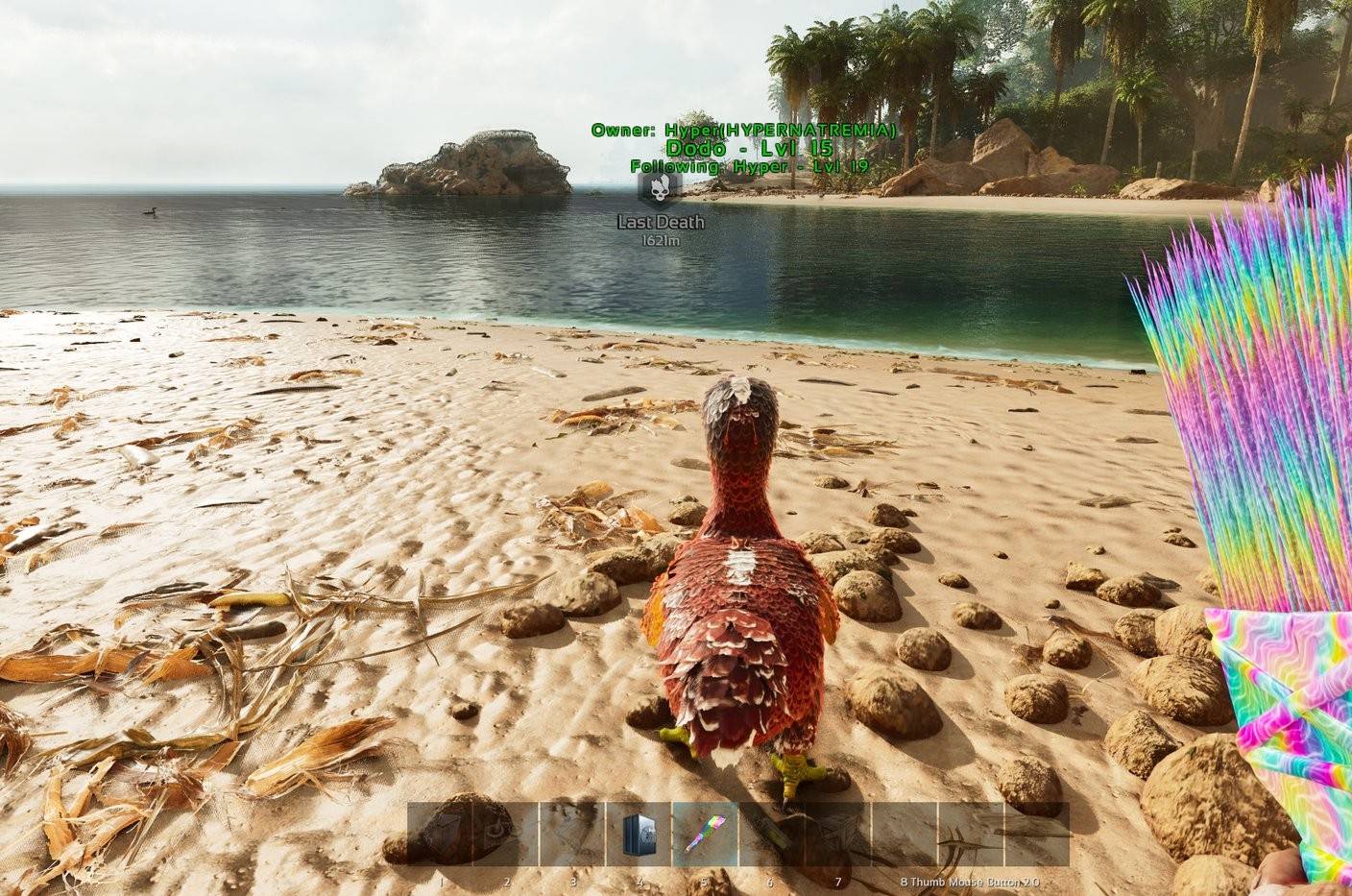
Paint your creatures region by region and see the colors live before you apply them. Works on PC and console.
My roleCreator
Built withARK DevKitBlueprintsUnreal Engine 5
TagsMod
Screenshots
Server stats
Updated Nov 21, 2026, 6:07 AM UTC
Stats started Nov 15, 2026.
88.9
Servers running it, average per day (since Nov 15)
1.3
Players per server, on average (since Nov 15)
11,000
Server-hours, all servers, since Nov 15
62%
PvE servers
On , the last whole day (UTC), 109 servers ran it. The first figure above is a daily average since Nov 15.
More server stats
| What | Since Nov 15 |
|---|---|
| Server starts | 921 |
| Panel opened | 942 |
| Paint sessions | 728 |
| Paints applied | 247 |
| Regions recolored | 1,110 |
| Randomizes | 126 |
| Palettes used | 361 |
| Grenades thrown | 61 |
| Creatures recolored by grenades | 60 |
Whole-server frame time (since Nov 15)
This is the whole server, not just this mod. ARK servers normally run near 33 ms a frame.
- under 16 ms0%
- 16-33 ms31%
- 33-50 ms65%
- 50-100 ms3%
- 100-200 ms1%
- over 200 ms0%
Maps (since Nov 15)
Versions in use (7 days)
- Stats build 172%
- Stats build 1128%
- Stats build 80%
- Stats build 100%
- Stats build 120%
How these numbers are collected
Servers running this mod send counts every few hours: totals only. No player names, ids or IP addresses. Each server sends under a random key that isn't linked to its name, and a new server only counts here after a day of normal reports.
Server owners can turn it off with StatsEnabled=False. Players can opt out with "Count me in the stats" in the mod's panel. Feedback is sent only when a player writes some, and their name only if they tick the box.
Numbers are rounded. More in the privacy page.
Recent updates
Changelogv11Nov 19, 2026PC, PC server, Xbox, PS5
New
- The Dino Painter brush says how many uses it has left in its description (or "unlimited")
- Admin mode without a mouse: press R3 on a controller or M on a keyboard (admins only)
Fixes
- The brush swings and paints again on every platform (since the rework a swing did nothing at all: no paint, no message)
- If a swing ever fails to reach the server, a message says so instead of nothing happening, and every refusal now says why
- Painting a creature with buildings on its platform saddle works when you aim at the buildings
- Painting is never free: closing the Paint window (Close, Escape, or B / O on a controller), switching pages or logging out without Apply puts the colors back and uses nothing. A paint left with no change for 5 minutes ends the same way
- A creature that is cryopodded or uploaded while you paint it keeps its new colors, so that uses your brush once
- The paint preview is now a side view: head to the right, feet down
- The Paint window only widens while it shows a creature
- Your settings: a switch the server decides now says "Set by the server." instead of "Changed by you" with nothing changing. If you changed one before, Reset clears your old choice
- Yes/No boxes: the "> <" mark follows your mouse, so Enter answers the one you point at
- For server owners: set answers with the value as it was saved ("Rex,Giga")
v7Nov 15, 2026PC, PC server, Xbox, PS5
Full rework
The brush and the grenade are rebuilt for the current devkit, with a proper paint window and a lot more control.
Key features
- Paint window: pick colors region by region on the creature you look at, see it live, then apply
- Randomize: any color, your active palette, or only the colors the species has in the wild
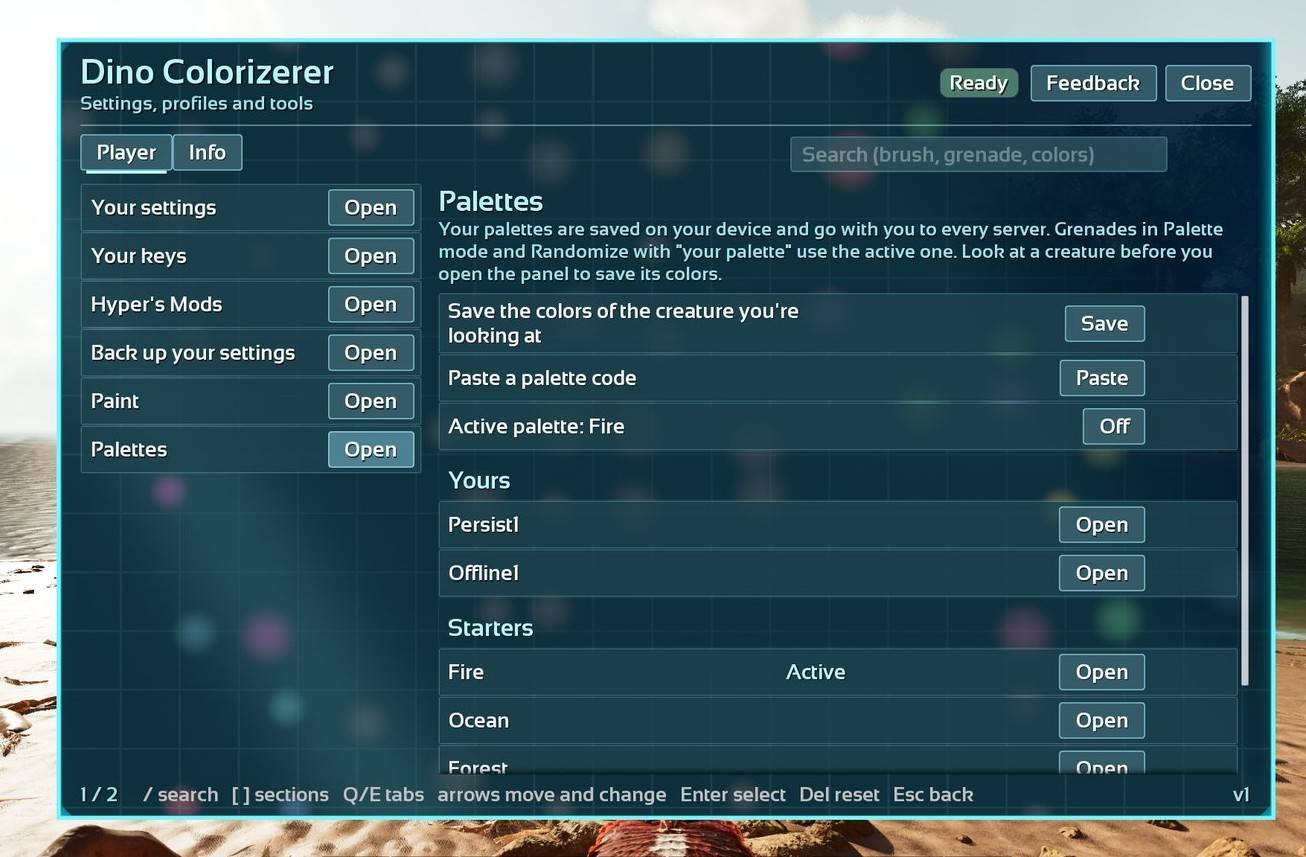
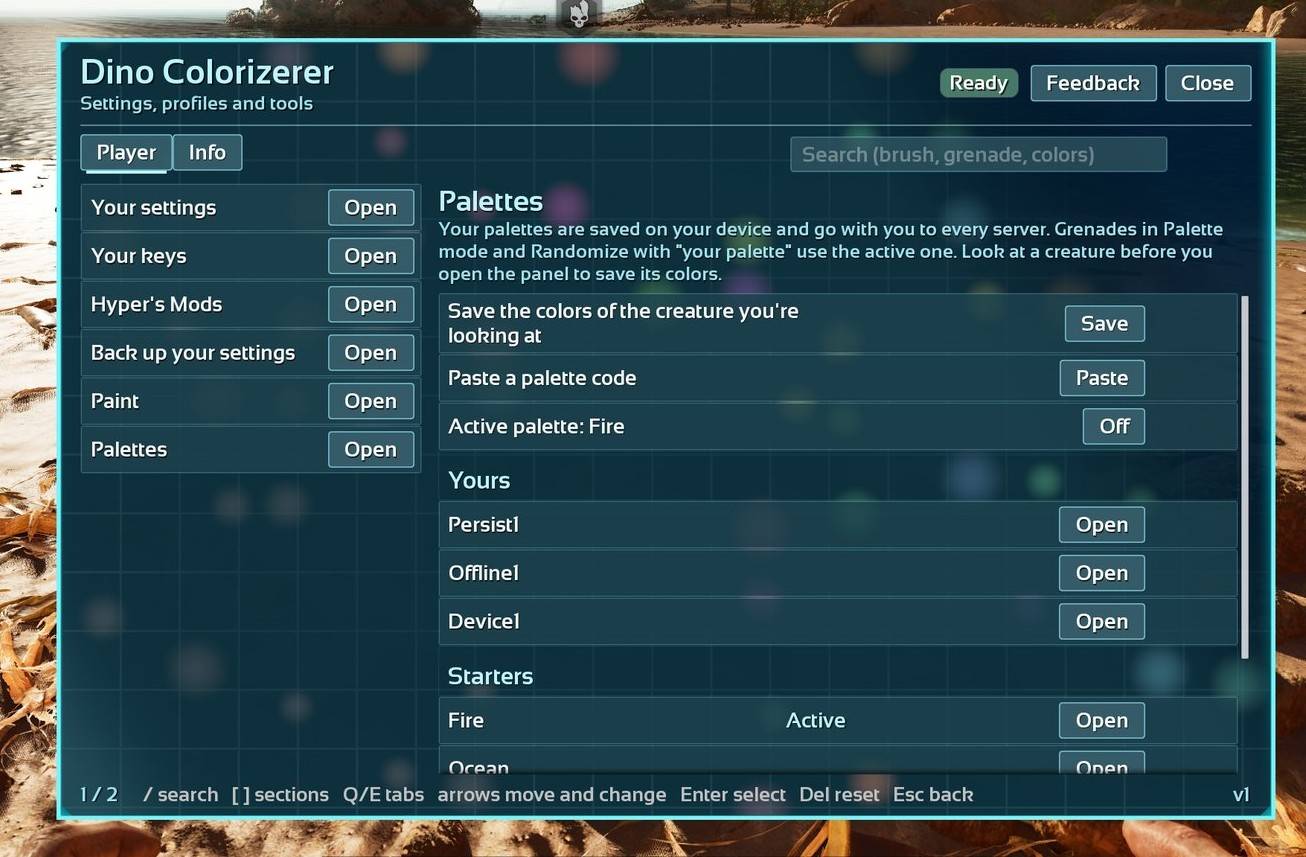
- Palettes: save a creature's colors, make one active, share it with a code, paste someone else's code. Palettes are saved on your device and follow you to every server and single player
- Herd paint: paint all your tames of one species nearby at once
- Color grenade: Random, Palette, or Party mode (colors cycle, then go back)
- Color lock: lock a tame's colors so only its tribe can change them, and no grenade can
- Undo your last paint for a few minutes after
- Inspect the colors of any creature you look at
- Mod color packs (Neon, Metallic)
- A card when someone else's grenade recolors one of your tames
For server owners
- Who can be painted: your tribe, allies, wild, enemies (each one a switch)
- Brush uses, paint range, cooldowns, herd range, grenade range and creature count
- Protected creatures (bosses and titans by default)
- Paint log with admin revert (one entry or the last few)
- Give brushes by EOS id
- Every setting has a page in the in game panel
- Works with the other Hyper mods: one "Hyper's Mods" button and radial folder
Fixes
- Leaving and rejoining a server no longer breaks the mod (every action was refused until a restart)
- In Paint, A or B (Enter or Escape) closes the open color swatches, and one press no longer opens and closes them
- Palettes > Save puts the name box at the top with a hint, and tells you if you weren't looking at a creature
- Players get the mod menu by default
- The Hyper's Mods button and page come back after you die and respawn
- Yes/No boxes no longer press the button behind them. With a controller they open on No: the D-pad picks and A answers. With a mouse, click Yes or No
- Your saved palettes and settings no longer reset if your body was killed while you were logged out
- All text uses American spelling (color, canceled, gray). Old setting names like ColourPacks keep working
v1Apr 11, 2025PC, PC server, Xbox, PS5
Rebuilt for Unreal Engine 5.8.
About this project
Hyper's Super Duper Dino Colorizerer
🆔 Mod ID: 1240231
Paint your creatures region by region and see it live before you apply. Every color and dye the server has, mod color packs, palettes you can share as codes, herd painting, and a color grenade.
Completely rebuilt, with a proper paint window and a lot more control. Works on PC and console, with keyboard and mouse or a controller.
🚀 Getting started
- Craft the Dino Painter brush from its engram (admins can also give brushes, see the commands below).
- Equip it and hit one of your creatures. The Paint window opens.
- Pick a region, choose a color, and watch the preview. Apply keeps the colors and uses the brush once. Cancel puts them back and does not use anything.
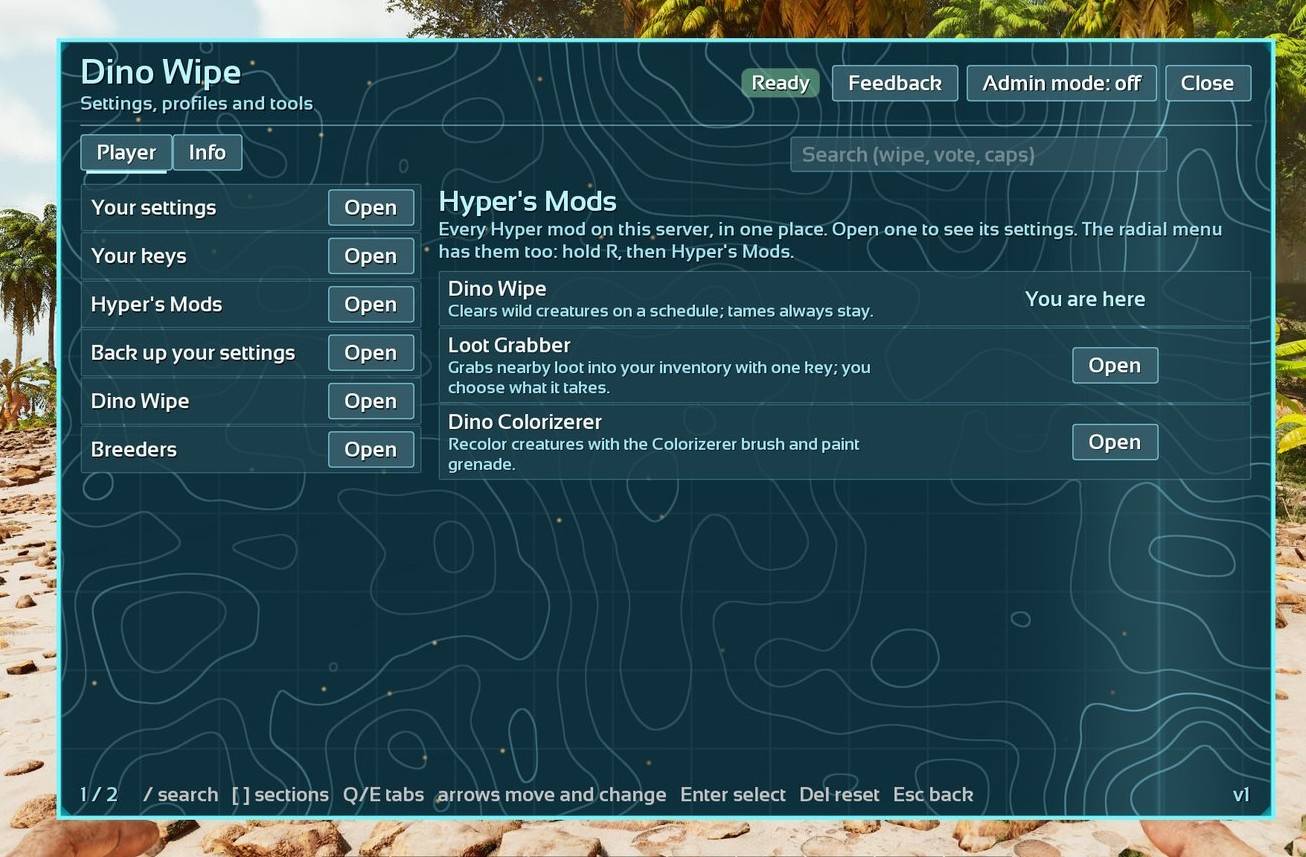
Open the panel any time from the Hyper's Mods button at the top right of your inventory, the radial menu (hold R on keyboard), or a panel key you pick under Your keys.
✨ What it does
🖌️ Painting
- Pick colors region by region with a live preview
- Randomize: any color, your active palette, or only the colors the species has in the wild
- Herd paint: paint all your tames of one species nearby at once
- Undo your last paint for a few minutes after
- Inspect: shows the color of each region of the creature you look at
- Controller: the D-pad walks the swatches, A picks, B closes
🎨 Palettes
- Save the colors of the creature you look at, with a name
- Make one active: grenades in Palette mode and Randomize from palette use it
- Share a palette as a short code, or add someone else's palette using their code
- Palettes are saved on your device and go with you to every server
- Five starters: Fire, Ocean, Forest, Midnight, Candy
💥 Color grenade
- Random, Palette, or Party mode (colors cycle for 6 seconds, then go back)
- Recolors up to 3 creatures in its cloud
- You get a card when someone else's grenade recolors one of your tames
🔒 Color lock: lock a tame's colors so only its own tribe can change them, and no grenade can.
🛠️ For server owners
- Who can be painted: your tribe, allies, wild, enemies (each one has a switch). Bosses and titans are protected by default
- Brush uses (1 by default, -1 is unlimited), paint range, cooldowns, herd range, grenade range and creature count
- Paint log for moderators: who painted which creature, before and after. Revert for admins: one entry or the last # paints, with a preview of what changes
- Give brushes by EOS id
- Every setting has a page in the panel: turn on Admin mode, then Server
- The full ini list, every console command and a default ini block are below
🧩 Item and engram paths
- Brush:
Blueprint'/HypersSuperDuperDinoColorizerer/Item/PrimalItem_WeaponPaintbrush_DinoPainterColorizerererer.PrimalItem_WeaponPaintbrush_DinoPainterColorizerererer' - Grenade:
Blueprint'/HypersSuperDuperDinoColorizerer/ColorNade/PrimalItem_ColorizererererGrenade.PrimalItem_ColorizererererGrenade' - Brush engram:
EngramEntry_Paintbrush_DinoPainter_C - Grenade engram:
EngramEntry_ColorizererGrenade_C
To keep the brush and grenade out of players' engrams (so only admins can give them), add this to Game.ini under [/script/shootergame.shootergamemode]:
OverrideNamedEngramEntries=(EngramClassName="EngramEntry_Paintbrush_DinoPainter_C",EngramLevelRequirement=999,EngramPointsCost=999,RemoveEngramPreReq=True)
OverrideNamedEngramEntries=(EngramClassName="EngramEntry_ColorizererGrenade_C",EngramLevelRequirement=999,EngramPointsCost=999,RemoveEngramPreReq=True)
🤝 Works with the other Hyper's mods
With two or more Hyper's mods on a server, they share one Hyper's Mods inventory button and one radial folder.
🔒 Privacy
The mod sends anonymous totals (paints, palettes and so on, never names or chat) and short health reports to Hypernatrema.com, so problems get fixed faster. Turn it off for the whole server with StatsEnabled=False and
StatusFeed=False. Each player can opt out under Your settings (Share stats).
💬 Support
Questions, bugs or ideas: join the Discord, https://discord.gg/jAHHABkuq5
⚠️ Known issues
- Long color names wrap mid-word
- The preview in the Paint window can look washed out in bright daylight
⚙️ Server settings (GameUserSettings.ini)
Every setting goes under [HypersSuperDuperDinoColorizerer] in GameUserSettings.ini. You only need the lines you want to change: anything you leave out uses its default. Restart the server after editing the file.
Most settings can also be changed live, without the ini: open the panel, turn on Admin mode, then Server. Or use the console: cheat ScriptCommand Hyp_HDC set {key} {value}. Settings marked Ini only can only be set in the file.
Who: Server = admins decide. Player = the ini sets the server default (and for limits, the most allowed), and each player can pick their own value in the panel under Your settings. Admins can lock any Player setting so players can't change it (cheat ScriptCommand Hyp_HDC lock {key}).
Distances are in game units (100 = 1 meter), except settings with Meters in the name. Lists are comma separated, like Neon,Metallic.
🎨 Your painting
| Ini key | Default | Allowed | Who | What it does |
|---|---|---|---|---|
CardOnRemoteRecolor |
True | True / False | Player | A card when someone else's grenade recolors one of your tames. |
RandomPool |
Any | Any / Palette / Natural | Player | Which colors Randomize uses: any color, your active palette, or the species' own. |
GrenadeMode |
Random | Random / Palette / Party | Player | What your grenade does: random colors, your active palette, or a color party that goes back afterwards. The server decides which ones you can pick. |
🖌️ Brush
| Ini key | Default | Allowed | Who | What it does |
|---|---|---|---|---|
IntCraftedColorizererUses |
1 | -1 to 6969 | Server | Uses on a newly crafted brush. -1 is unlimited. |
PaintRangeMeters |
30 | 5 to 100 | Server | How close you need to be to paint a creature. |
PaintCooldownSeconds |
0 | 0 to 3600 | Server | Seconds between paints for each player. 0 is no wait. |
AllowHerdPaint |
True | True / False | Server | Players can paint all their tames of one species nearby at once. Each creature uses the brush once. |
HerdPaintRadiusMeters |
30 | 5 to 100 | Server | How far a herd paint reaches. |
🐾 Who can be painted
| Ini key | Default | Allowed | Who | What it does |
|---|---|---|---|---|
BoolAllowTribePainting |
True | True / False | Server | The brush can paint your own tribe's creatures. |
BoolAllowAllyPainting |
False | True / False | Server | The brush can paint allied tribes' creatures. |
BoolAllowWildPainting |
False | True / False | Server | The brush can paint wild creatures. |
BoolAllowEnemyPainting |
False | True / False | Server | The brush can paint enemy tribes' creatures. |
💥 Grenade
| Ini key | Default | Allowed | Who | What it does |
|---|---|---|---|---|
GrenadeAllowEnemy |
False | True / False | Server | The grenade can recolor enemy tribes' creatures. It also needs "Paint enemy creatures". |
GrenadeRadiusMeters |
9 | 2 to 30 | Server | How far the cloud reaches. |
GrenadeMaxCreatures |
3 | 1 to 10 | Server | The most creatures one grenade recolors. |
GrenadeModes |
Random,Palette,Party | text (up to 64 characters) | Server | Which grenade modes players can pick: Random, Palette (your active palette), Party (colors cycle, then go back). |
GrenadeCooldownSeconds |
0 | 0 to 3600 | Server | Seconds between grenades for each player. |
GrenadePartySeconds |
6 | 2 to 20 | Server | How long a Party grenade keeps changing colors before the creatures go back. |
🛡️ Protection
| Ini key | Default | Allowed | Who | What it does |
|---|---|---|---|---|
ProtectedClasses |
Boss | text (up to 2048 characters) | Server | Creatures that can never be painted, as class names separated by commas. Boss covers every boss and titan. |
AllowColorLock |
True | True / False | Server | Tribes can lock a tame's colors. Then only its own tribe can change them, and no grenade can. |
🌈 Colors
| Ini key | Default | Allowed | Who | What it does |
|---|---|---|---|---|
ColorPacks |
Neon,Metallic | text (up to 64 characters) | Server | The mod's own color packs players can use. |
AllowNaturalRandom |
True | True / False | Server | Randomize can use only the colors the species has in the wild. |
📝 Paint log
| Ini key | Default | Allowed | Who | What it does |
|---|---|---|---|---|
PaintLogSize |
100 | 0 to 1000 | Server | How many paints the admin log keeps. |
RestoreWindowMinutes |
10 | 0 to 120 | Server | How long you can still undo your last paint on a creature after closing the picker. |
🧰 Shared settings (every Hyper mod has these)
Panel access, logs, request limits, anonymous stats, the admin list and your cards. Most servers never change these.
| Ini key | Default | Allowed | Who | What it does |
|---|---|---|---|---|
Enabled |
True | True / False | Server | Turns the mod on or off. Status, commands and admin mode still work when it's off. |
LogLevel |
Info | Trace / Info / Warn / Error | Server | How much the mod writes to the server log. |
DebugEnabled |
False | True / False | Server | Starts the server with debug on. You can also switch it live with 'debug on' or 'debug off'. |
DebugForwardLevel |
Info | Trace / Info / Warn / Error | Server | The lowest log level sent to admins who follow the live log. |
RingSize |
200 | 50 to 1000 | Server | How many recent log lines the server keeps for the debug page. |
PageSize |
100 | 10 to 100 | Server | Rows on each page of a list. |
RateScale |
1.0 | 0.25 to 10 | Server | Slows down how often players can send requests (1 = normal, 2 = half as often). |
FloodCalls |
20 | 5 to 200 | Server | Requests each player can send every 2 seconds. |
NotifyRefusals |
True | True / False | Server | Tells players why something they tried was refused. |
PanelForPlayers |
True | True / False | Server | Lets players who aren't admins open the panel. |
LogChannels |
(empty) | text (up to 256 characters) | Server | Log levels per channel, like grab:Trace,http:Warn. |
NotifyAdminsOnError |
False | True / False | Server | Sends every error to the admins who are online as a card. |
NotifyRate |
5 | 1 to 20 | Server | Most cards a player gets every 10 seconds. |
WebCodes |
True | True / False | Server | Lets you share server settings through a short code on the website. |
StatsEnabled |
True | True / False | Server | Shares anonymous totals with the mod's website. Turn off to share nothing. |
StatusFeed |
True | True / False | Server | Sends short health reports (no names, no chat) so problems get fixed faster. |
StatsHours |
3.0 | 1 to 12 | Server | Hours between stats uploads. |
StatsBatchKB |
16 | 4 to 32 | Server | Upload sooner once this much is waiting (KB). |
StatDeltaCap |
1000000 | 1000 to 100000000 | Server | Highest count any one stat can add per upload. |
StatsDisplay |
All | All / Admins / Off | Server | Who can see the Stats page. |
StatsToken |
(empty) | text (up to 128 characters) | Ini only | A token from the website, if you were given one. Most servers leave this empty. Set it in the ini file only, then restart the server. |
CommEnabled |
True | True / False | Server | Lets other mods ask this one questions. |
CommAllowLoosen |
False | True / False | Server | Lets other mods loosen this mod's rules too, not only tighten them. |
CommMaxSeconds |
600 | 5 to 86400 | Server | Longest time another mod can change a setting for. |
HeartbeatSeconds |
60 | 15 to 600 | Server | Seconds between the mod's health checks. |
JobDelay |
0.05 | 0.02 to 2 | Server | Seconds between each step of long jobs. |
JobBudgetMs |
4 | 1 to 50 | Server | How much a long job does in each step. |
SafeModeOnBootFail |
True | True / False | Server | If the mod fails to start properly, it switches to safe mode. |
BindPossession |
False | True / False | Server | Also set players up when they spawn, not only when they join. |
AdminAllowlist |
(empty) | text (up to 2048 characters) | Ini only | Your admins, as id:tier,id:tier with their account ids. Set it in the ini file only, then restart the server. |
AllowlistEditors |
CheatAdmin | CheatAdmin / ListedAdmin / Nobody | Ini only | Who can change the admin list from the panel. Set it in the ini file only, then restart the server. |
AdminsNeedAllowlist |
False | True / False | Ini only | Server admins count as mod admins only if they're on the admin list. Set it in the ini file only, then restart the server. |
CommandPrefix |
(empty) | text (up to 24 characters) | Ini only | A different command prefix, for when two mods use the same one. Set it in the ini file only, then restart the server. |
NotifyScale |
1.0 | 0.75 to 1.5 | Player | How big your cards are. |
NotifyCorner |
TopRight | TopRight / TopLeft / BottomRight / BottomLeft | Player | Which corner of the screen your cards show up in. |
NotifyMax |
4 | 1 to 8 | Player | How many cards you see at once. |
NotifySounds |
True | True / False | Player | Plays a sound when a card shows up. |
NotifyOverMenus |
True | True / False | Player | Shows cards while your inventory, map or other menus are open. |
AdminCards |
True | True / False | Player | Shows you the cards sent to all admins (admins only). |
ShareStats |
True | True / False | Player | Counts what you do in the mod's overall stats. Totals only, never your name. |
PanelEffects |
Full | Full / Reduced / Off | Player | The panel's moving background: Full, Reduced (slower) or Off (still). |
💻 Console commands
As an admin in game: cheat ScriptCommand Hyp_HDC {command}. Over RCON: ScriptCommand Hyp_HDC {command} (RCON gets no reply text; the answer goes to the server log). Players can run the commands marked Player in the chat console the same way.
| Command | Who | What it does |
|---|---|---|
help [command] |
Moderator | Lists the commands you can run, or explains one. |
version |
Moderator | Shows the mod's name and version. |
status |
Moderator | How the mod is doing, in one line. |
settings [key] |
Admin | Lists every setting with its value and where it came from. |
settings ini |
Admin | Writes your current settings as an ini block you can paste. |
settings export |
Admin | Gives you the server settings as text to copy to another server. |
settings import {text} [confirm] |
Admin | Shows what would change, then applies it with 'confirm'. |
set {key} {value} |
Moderator | Changes a server setting. |
unset {key} |
Moderator | Puts a setting back to its default. |
reload |
Admin | Reloads the settings. Changes to the ini file still need a restart. |
debug on/off |
Admin | Turns server debug on or off. |
debug dump [n] |
Admin | Copies the mod's most recent log lines into the server log. Add a number to choose how many. |
debug level {0..3} |
Admin | Changes how much the mod writes to its log until the next restart: 0 everything, 1 normal, 2 warnings, 3 errors only. |
debug stats |
Admin | Writes how many requests players sent the server, by kind, to the server log. |
lock {key} |
Moderator | Locks a setting so players can't change it. |
unlock {key} |
Moderator | Lets players change a setting again. |
adminmode |
Admin | Shows who has admin mode on. |
stats [send/body/reset/every {minutes/off}] |
Admin | Shows the server's stats. 'send' uploads now; in the devkit 'reset' clears them and 'every N' uploads every N minutes. |
comm |
Admin | Shows the other mods this one talks to. |
panel [page] |
Moderator | Opens the panel. |
players |
Moderator | Shows who's online and set up. |
allowlist |
Admin | Shows the admin list. |
jobs |
Moderator | Shows the mod's tasks that are running right now. |
job cancel {kind} |
Admin | Stops a running task. |
safemode on/off [confirm] |
Admin | Turns safe mode on or off. |
give {EOS id/me} {count} {uses} |
Admin | Gives a player brushes. Uses -1 is unlimited. |
log [page] |
Moderator | Shows the paints, newest first, one page at a time: who, which creature, before and after. |
revert {entry}/last {n} [confirm] |
Admin | Puts a creature back to its colors before a paint in the log, or undoes the last n paints. It asks first and shows what will change. |
lockcolors |
Player | Locks or unlocks the colors of the tame you're looking at. Locked: only its tribe can change them, and no grenade can. |
undo |
Player | Puts back the colors from before your last paint, for a few minutes after it. |
palette [save/use/off/code/add/delete] [name or code] |
Player | Your palettes. Alone: the list. save: the colors of the creature you look at. use: the active one (grenades, Randomize). off: none active. code: a code to share. add: paste a code. |
inspect |
Player | Shows the colors of the creature you're looking at. |
colors |
Moderator | How many colors and dyes this server has, mod colors included. |
givecolorizereroes {EOS id} {count} {uses} |
Admin | Gives a player brushes by their EOS id. |
📋 Default ini block
Every setting of this mod with its default, ready to paste under the section and edit. Lines you don't change can be deleted.
[HypersSuperDuperDinoColorizerer]
IntCraftedColorizererUses=1
BoolAllowTribePainting=True
BoolAllowAllyPainting=False
BoolAllowWildPainting=False
BoolAllowEnemyPainting=False
PaintRangeMeters=30
PaintCooldownSeconds=0
AllowHerdPaint=True
HerdPaintRadiusMeters=30
GrenadeAllowEnemy=False
GrenadeRadiusMeters=9
GrenadeMaxCreatures=3
GrenadeModes=Random,Palette,Party
GrenadeCooldownSeconds=0
GrenadePartySeconds=6
ProtectedClasses=Boss
AllowColorLock=True
ColorPacks=Neon,Metallic
AllowNaturalRandom=True
PaintLogSize=100
RestoreWindowMinutes=10
CardOnRemoteRecolor=True
RandomPool=Any
GrenadeMode=Random